
Lumbertubs Primary School
Online Safety
BACK TO SCHOOL - ONLINE SAFTEY TIPS



Online Safety and Wellbeing Updates
Simon Aston, Online Safety and Wellbeing Officer
Report Remove Childline- Remove a shared image or video online
The NSPCC and the IWF have launched a tool to support children and young people in removing nude images or videos of themselves from the internet. The tool is called ‘Report Remove’ and children will be asked to create a Childline account and then report their image to the IWF. The service will provide safeguarding support to young people through Childline as well as working to take down image or video.
Quick 5 online safety tips for parents and carers - Video 3
Online Safety and Wellbeing The 6 weeks holidays is fast approaching and children and young people potentially spending more time online Simon Aston has a video on YouTube to help safeguard young people online. To see the latest video, Online Safety and Wellbeing - Top 5 tips to keep children safe online as we ease out of lockdown
Online Safety Tips for Devices



Digital 5 a day
Easy to follow, practical steps for children and parents to achieve a healthy and balanced digital diet.
The digital 5 a day provides a simple framework that reflects the concerns of parents/ carers as well as children’s behaviours and needs. It can also act as a base for family agreements about internet and digital device use throughout both the holidays and term time.
Based on the NHS’s evidence-based ‘‘five steps to better mental wellbeing’, the digital 5 a day campaign gives children and parents easy to follow, practical steps to achieve a healthy and balanced digital diet.
1. Connect
The internet has enabled everyone to maintain friendships and family relationships no matter where they are in the world and children often say that chatting with friends is the best thing about social media.
It’s important to acknowledge that this is how children keep in touch but it’s also important to have a conversation with them about who they are connecting with and their privacy settings. Remember to keep a dialogue open and talk to your child to understand how they’re spending their time and so that they can come to you for help should they need to.
2. Be active
Activity is very important for mental wellbeing and all children should have time to switch off and get moving.
Children don’t have to be an athlete to be active. Find something that they enjoy – be that swimming, walking, dancing or yoga – begin at a level that works for them and make it a regular activity.
Researching an activity or place online before going out is a good way of combining the two and provides an opportunity for you to use the internet together.
3. Get creative
The internet provides children with unlimited opportunities to learn and to be creative. From learning to code to building complex structures in Minecraft to creating video content, the summer can be a great opportunity for children to build their digital skills. Time spent online doesn’t have to be spent passively consuming content. It can be educational, creative and can provide opportunities to build skills for later life.
4. Give to others
As well as using the internet to learn about how to get involved with local and national charitable schemes, children can give to others through their everyday activities.
Remind children that by giving positive feedback and support to friends and family as well as reporting the negative behaviour of others, children can help the web make a positive place for everyone.
5. Be mindful
We hear that children often feel pressured by the constantly connected nature of the internet. While they might want to do other things, it can be difficult for them to put their phones down when apps are encouraging them to engage. Being mindful about the amount of time that your child is spending online – and encouraging them to be mindful about how this makes them feel – is important.
Encourage children to come up with ways of managing this i.e. keeping a diary as way of logging the amount of time they are spending online or downloading an app that helps them manage their notifications.
More information and video clips can be found on: https://www.childrenscommissioner.gov.uk/digital/5-a-day/
How Can I Ensure My Child Is Safe Online?
You don’t need to be a technical expert to protect your child on the internet. Here are some very simple steps to keep your child safe online.
- Ensure you are aware which websites your children are using. Talk to your child about the websites that they use and involve yourself in their internet use, so that you understand. Explain to your children you’re helping to keep them safe.
- The internet is a fantastic learning and communication tool, so be positive about it and try not to overreact to minor issues. If your child worries that you may take away their access, they could become secretive and hide problems from you.
- Wherever possible, keep PCs, laptops and games consoles out of bedrooms, so that it is easier for you to monitor your child’s internet use. Please also remember that games consoles can be used for on-line gaming and therefore your child can chat to people online
- Just like school, set clear expectations and ground rules for when your child is on-line. If they understand what is and isn’t acceptable, it may help them to navigate any problems in the future.
- Make sure all devices that connect to the internet have parental controls to help you set appropriate boundaries. Find your service provider and learn how to set your controls. if you are unsure about this, please contact Mrs Reeve our ICT and Online Safety lead, who will be only too happy to help.
- Make sure that you are in control of the privacy settings for any of the on-line apps being used by your child. These need to be checked regularly to ensure that they are at the highest setting.
- For child-friendly information and advice visit: https://www.bbc.co.uk/cbbc/findoutmore
- Handy posters to inform parents can be found at: https://nationalonlinesafety.com/guides
Below are parent friendly websites, which are designed to inform about different apps, games and social media:
Thinkuknow. Parent and carers guide to sharing images (Primary)
This video looks at why children like sharing pictures and videos, what the risks are, and what parents and carers can do to help their child share safely.
E-Safety Tips for Parents: Under 5
More and more pre-schoolers are using their parents' computers, smartphones or tablets to play games, use apps, and watch their favourite TV shows. There are simple things you can do to make sure they're using the internet safely.
E-Safety Tips for Parents: ages 6-10
Early use of digital technology has been shown to improve language skills and promote children's social development and creativity. But it's not without risks for young children, who may come across inappropriate content or begin to copy what older children do online. See our advice to understand what you can do to give young children the best experience of going online.
E-Safety Tips for Parents: 11-13
As children between the ages of 11 and 13 make the transition to a more independent stage with the move to secondary school, they become more confident internet users with more varied habits. Internet use can be hugely positive for children, but it's vital to continue discussing online safety with them.
Online Safety Tips for Christmas
For Children with New Devices
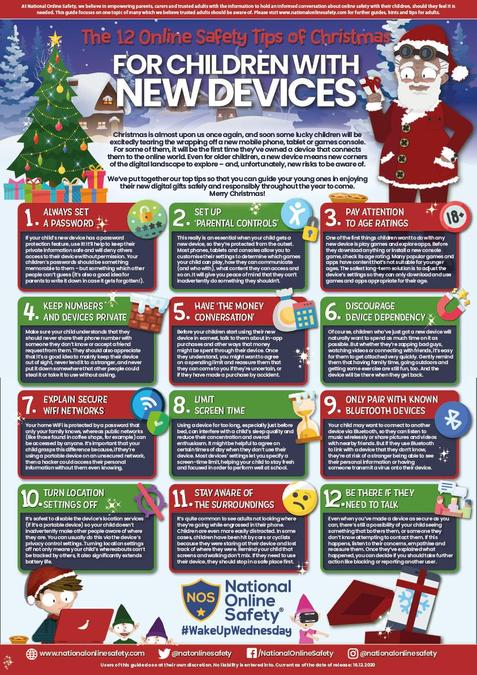
Christmas is a time when some lucky children will be excitedly tearing the wrapping off a new mobile phone, tablet or games console. For some of them, it will be the first time they’ve owned a device that connects them to the online world. Even for older children, a new device means new corners of the digital landscape to explore – and unfortunately, new risks to be aware of.
We’ve put together our top tips so that you can guide your young ones in enjoying their new digital gifts safely and responsibly throughout the year to come.
In the guide, you'll find tips such as how to turn location settings off, how to discourage device dependency and how to set up parental controls.
Suggested Games and Apps for Children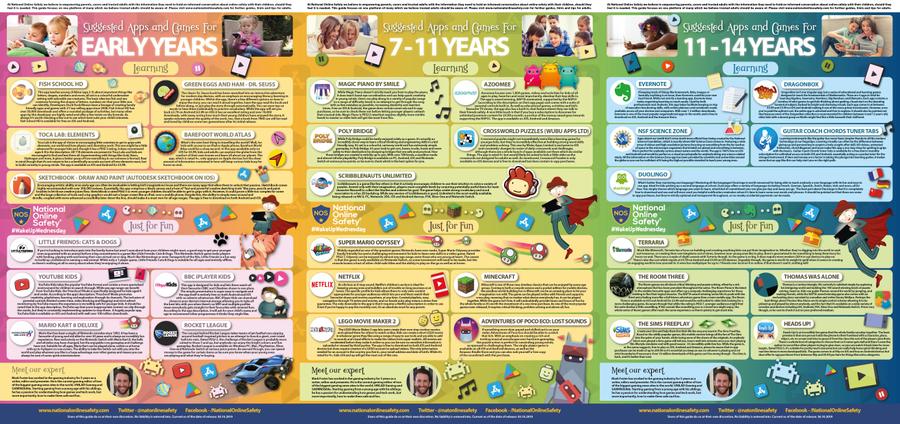
Please see the link to our Online Safety Policy